
Organize a long video around a sequence of meaningful questions, use chapter-level payoffs, and keep a source-and-continuity record. Length should come from the depth of the explanation rather than repeated setup or decorative scenes.
Long-form faceless production becomes manageable when the script has a clear architecture. The viewer needs to know what question is being explored, why the next section follows, and what has been learned so far. Treat the video as a connected argument or story, not several short scripts pasted together with repeated introductions.
Step by step
Write the central question and chapter map
Define the one question the whole video answers. Divide it into a small set of subordinate questions that genuinely advance the explanation. For a history of a familiar invention, chapters might cover the original problem, competing approaches, a decisive change, and present-day consequences. Remove chapters that belong to a different video.
Build a source ledger before drafting
Associate important claims with their supporting sources and note uncertainty. Track dates, names, numbers, and quotations separately. This makes the review possible when the script becomes long. Do not rely on remembering which article supported a claim after several production sessions.
Write transitions that preserve the argument
At the end of each chapter, explain what changed and why the next question matters. Avoid repeating the entire introduction. A concise transition can connect a failed design to the new constraint it revealed, giving the viewer a reason to continue beyond simple curiosity about the next heading.
Plan visual reuse and continuity
Maintain a style sheet for recurring objects, colors, locations, and labels. Reuse a diagram when the argument returns to it, adding only the new information. Long videos benefit from familiar visual landmarks because viewers otherwise have to relearn the presentation language at every chapter.
Review the whole experience
Check individual sections for accuracy, then watch the complete sequence for repetition and missing context. Listen for inconsistent narration levels and pronunciation. Verify chapter labels and the final conclusion. The completed export needs an end-to-end review even if every segment was approved separately.
The workflow inside Golpo
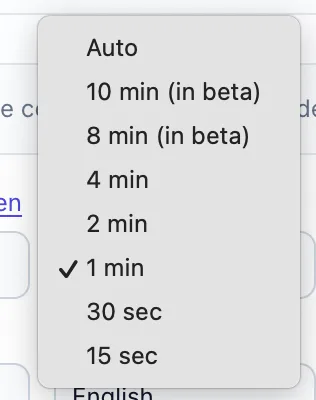
Use these real interface views to find the creation and review controls. Apply the decisions from this guide to your own brief, then review the resulting script and visuals before publishing.

Budget effort by explanatory difficulty
A short but complex diagram may need more work than several minutes of straightforward narration. Mark the difficult scenes early and test them before producing the entire video. Keep a contingency plan for scenes that need simplification. This prevents the hardest visual problem from appearing only at the end of production.
Give the ending a real job
Return to the central question and show how the chapters changed the answer. A list of everything already said is less useful than a concise synthesis. If the evidence leaves uncertainty, state it clearly rather than manufacturing a decisive conclusion to justify the long runtime.
Worked example: the evolution of a household object
A long explanation follows one object from an everyday problem through successive design decisions. The same silhouette and timeline return throughout, while each chapter introduces a new constraint. The conclusion explains why the current form makes sense.
Create a chapter architecture for a 15-minute faceless documentary about the evolution of a household object. Include the central question, five subordinate questions, source requirements, chapter payoffs, and visual continuity notes. Do not invent historical facts. Use placeholders for verified evidence and identify the most difficult diagram to prototype first.
Before you publish
- Chapter map coherent
- Claims traceable
- Transitions purposeful
- Continuity documented
- Full export reviewed
Now, make it yours.
Start with a prompt, bring your script, or turn document text into a video.
You’ll review the setup in Golpo.
Sign-in and plan limits apply.
Your complete text is ready. It is too long to send reliably in a link. Copy it, open Golpo, and paste it into the prompt or script field.
Open GolpoCommon questions
Should I generate the entire video at once?
Choose a workflow that supports the length and review control you need. Test the current tool limits and keep an approved script regardless of generation method.
How do I avoid filler?
Ask what new understanding each section adds. Cut repeated explanations and unrelated examples even when they make the video shorter.
Sources & useful reading
Published November 24, 2026. Product features and platform policies can change; linked official documentation is the source for current availability. Examples are illustrative production briefs.