
Yes, some AI video systems support videos longer than ten minutes. Check the specific product, plan and workflow, then design the script in chapters and test continuity. A maximum duration is a technical limit, not evidence that a long video will remain useful or engaging.
Long-form production raises different problems from a short demo. Names, visual conventions, pacing and argument structure must stay consistent for much longer. Start with a reason the subject needs the runtime, then choose a production method that can handle both the length and the revisions.
Step by step
Confirm the actual duration limit
Read the current product page and the controls available to your account. Golpo Studio advertises long-form generation up to sixty minutes; plan eligibility and available settings still need checking. Do not assume a free trial or every engine shares that maximum.
Estimate narration from a real read
Read a representative paragraph at the intended pace and time it. Use that measurement to estimate the script length, then leave space for demonstrations and pauses. A fixed word-count formula can misjudge technical terms, dialogue and non-English narration.
Build chapter-level promises
Give every chapter a question, explanation and payoff. Outline transitions before drafting all the words. If a section repeats the previous conclusion without adding understanding, cut or combine it rather than filling the requested duration.
Create a continuity sheet
Record names, character descriptions, colors, diagram conventions and pronunciation notes. Reuse that sheet across the production. A recurring visual should retain its meaning so viewers do not need to relearn the diagram language in each chapter.
Generate a representative test
Test a difficult segment containing the longest terms, recurring character and most complex diagram. Check how revisions work before committing to a full production. Use the result to simplify the visual brief or adjust the narration pace.
Review in two passes
First watch for the argument and chapter rhythm, then inspect facts, labels, audio and transitions. Keep a timestamped correction list. Verify the final exported runtime and file rather than assuming the selected duration guarantees the delivered result.
The workflow inside Golpo
Use these real interface views to find the creation and review controls. Apply the decisions from this guide to your own brief, then review the resulting script and visuals before publishing.

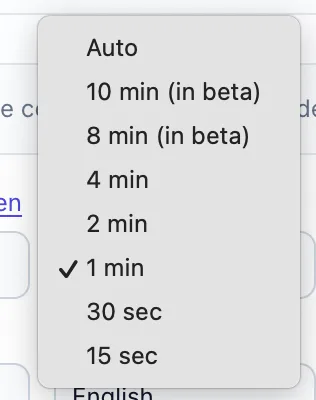
One generation or several chapters?
A single generation can simplify continuity and assembly when the tool supports it. Separate chapters can make revision and review easier. Choose according to the product’s actual limits and your distribution needs, and avoid promising a single continuous output before testing that workflow.
Earn the extra minutes
A long video needs meaningful development: new evidence, escalating consequences, worked examples or an unfolding story. Padding an introduction or repeating the same lesson makes the video longer without deepening the experience. Let the outline justify the runtime before production begins.
A twelve-minute product training lesson
Organize the lesson around setup, first success, common failure and recovery. The viewer sees one example progress across all four chapters. A small pilot tests whether the interface labels and narration remain readable before the full lesson is generated.
Plan a twelve-minute animated training lesson from my source document. Build four chapters: setup, first successful task, common failure and recovery. Use one consistent sample project throughout. Give each chapter a clear learning objective and a short check for understanding. Identify repeated explanations to remove. Preserve the approved terminology and flag missing steps. Estimate duration from the supplied narration sample, and confirm the selected video tool and plan can support the intended workflow before generation.
Before you publish
- Account limit checked
- Timed narration sample
- Distinct chapter payoffs
- Continuity sheet
- Full export reviewed
Now, make it yours.
Start with a prompt, bring your script, or turn document text into a video.
You’ll review the setup in Golpo.
Sign-in and plan limits apply.
Your complete text is ready. It is too long to send reliably in a link. Copy it, open Golpo, and paste it into the prompt or script field.
Open GolpoCommon questions
Does a sixty-minute limit mean every video should be long?
No. Choose the shortest length that fully serves the audience. A focused seven-minute explanation may be more useful than a longer version with repeated material.
Can I combine shorter videos?
Yes, if your editing workflow supports assembly. Plan matching audio, chapter transitions and visual conventions so the result feels like one lesson rather than unrelated clips.
Sources & useful reading
Published November 24, 2026. Product features and platform policies can change; linked official documentation is the source for current availability. Examples are illustrative production briefs.